How to Create a Pitch Deck
A step-by-step framework for building compelling pitch decks that win deals, secure funding, and open partnerships — whether you're presenting to investors, prospects, or executive stakeholders.
What Makes a Great Pitch Deck
A pitch deck is a short, visual presentation designed to convince someone to take a specific action — invest in your company, buy your product, or partner with your team. The best pitch decks don't just inform. They persuade.
The ideal pitch deck is 10-15 slides. Fewer than 10 and you're probably skipping something important — like proof or pricing. More than 15 and you're losing your audience. Every slide should advance the narrative or answer a question the audience is already thinking.
Not all pitch decks are the same. An investor deck leads with the market opportunity and business model. A sales deck leads with the prospect's pain and your solution. A partnership deck leads with mutual value. An internal deck leads with the strategic case for change. The structure shifts, but the principle stays the same.
Key principle: A pitch deck is a story, not a data dump. Data supports the story — it doesn't replace it. The moment your audience starts reading instead of listening, you've lost control of the room.
Define Your Objective & Audience
Before you open a slide editor, answer two questions: What do I want the audience to do after this presentation, and what do they care about most?
Start by determining your deck type. Each has a different goal and a different audience mindset:
- Sales deck: Convince a prospect to move forward in the buying process. The audience cares about their specific pain, your solution, and proof it works for companies like theirs.
- Investor deck: Secure funding or a follow-up meeting. Investors care about market size, traction, team, and the path to returns.
- Partnership deck: Propose a collaboration. Partners care about mutual benefit, strategic alignment, and low-friction implementation.
- Internal deck: Get buy-in for a project, budget, or strategy shift. Stakeholders care about business impact, resource requirements, and risk.
Next, define your specific outcome. "Get them excited" is not a goal. "Schedule a technical demo with the VP of Engineering by end of week" is. The more precise your desired outcome, the sharper every slide becomes.
Finally, research your audience. What are their current priorities? What objections will they raise? What language do they use to describe the problem you solve? A pitch deck built for a CFO looks fundamentally different from one built for a Head of Product — even if the product is the same.
Build Your Narrative Arc
Every great pitch deck follows a four-part narrative structure: Problem → Solution → Proof → CTA. This isn't a template suggestion — it's how persuasion works. You establish tension, resolve it, prove the resolution is real, then ask for action.
Problem (slides 1-3): Hook your audience with a problem they feel. This is not your opportunity to list features — it's your opportunity to show that you understand their world. Use a specific statistic, a relatable scenario, or a question that makes them nod. The goal is recognition: "Yes, that's exactly what we're dealing with."
Solution (slides 4-6): Present your approach as the answer to the problem you just described. Lead with the outcome, not the mechanism. "We reduce proposal turnaround from 2 weeks to 2 hours" hits harder than "We use AI-powered document generation." Then explain the mechanism — keep it to three pillars or steps maximum.
Proof (slides 7-9): This is where skepticism dies. Show logos of companies that use your product. Quote a specific result: "Acme Corp increased close rates by 34% in 90 days." Include a brief case study if you have one. Data without context is noise — always tie metrics back to the outcome the audience cares about.
CTA (slides 10-12): Close with clarity. What exactly do you want the audience to do next? When should they do it? What happens after they say yes? The weaker your CTA, the less likely you are to get movement. "Let me know if you're interested" is not a CTA. "Let's schedule a 30-minute technical demo this Thursday" is.
Pro tip: Before you create a single slide, write the narrative as a 60-second spoken pitch. If you can tell the story verbally in under a minute — problem, solution, proof, ask — your deck structure is right.
Gather Your Content & Data
With your narrative arc defined, it's time to assemble the raw materials. This is the step most people rush through — and it shows in the final deck. A pitch deck built on thin content will always feel thin, no matter how good the design is.
Collect these assets and organize them by the slide where they'll appear:
- Case studies and success stories. Real results from real customers. Include the company name (with permission), the challenge, what you did, and the measurable outcome.
- Metrics and data points. Revenue impact, time saved, efficiency gains, NPS scores — anything quantifiable. Avoid vanity metrics. "10,000 users" means nothing without context; "10,000 users, 40% month-over-month growth" tells a story.
- Testimonials and quotes. Direct quotes from customers or partners. Attribute them with name, title, and company. An attributed quote is 3x more credible than an anonymous one.
- Competitive positioning. How you compare to alternatives (including the status quo). Don't bash competitors — position yourself on the dimensions where you genuinely win.
- Pricing and packaging. Even if you don't include exact pricing in the deck, have it ready. You'll need it for Q&A.
- Visual assets. Product screenshots, architecture diagrams, team photos, client logos. Always use the highest resolution available.
Design Your Slides
Design is where most pitch decks either come together or fall apart. You don't need to be a designer — you need to follow a few principles consistently.
One idea per slide. This is the most violated rule in pitch decks. If a slide is trying to communicate two things, split it into two slides. Your audience can only absorb one concept at a time while listening to you speak.
Limit text to 30 words per slide. This forces you to distill your message. If you need more context, that's what your verbal delivery is for. Bullet points with 3-5 words each outperform full sentences every time.
Use high-contrast visuals. Dark text on light backgrounds or light text on dark backgrounds. Avoid medium-gray text on white — it's unreadable on a projector. If you're presenting on screen, test your slides on the actual display beforehand.
Maintain consistent branding. Use your company's colors, fonts, and logo placement on every slide. Inconsistency signals sloppiness. Choose 2-3 colors maximum and stick to one font family.
When laying out slides, use these common patterns:
- Title slide: Company name, tagline, and a single powerful image or graphic. No clutter.
- Content slide: Headline at the top, 3-4 bullet points or a short paragraph, supporting visual on the right or below.
- Comparison slide: Two or three columns showing before/after, you vs. alternatives, or option A vs. option B.
- Quote slide: Large pull quote centered on the slide with the author's name and title beneath. Let the quote do the talking.
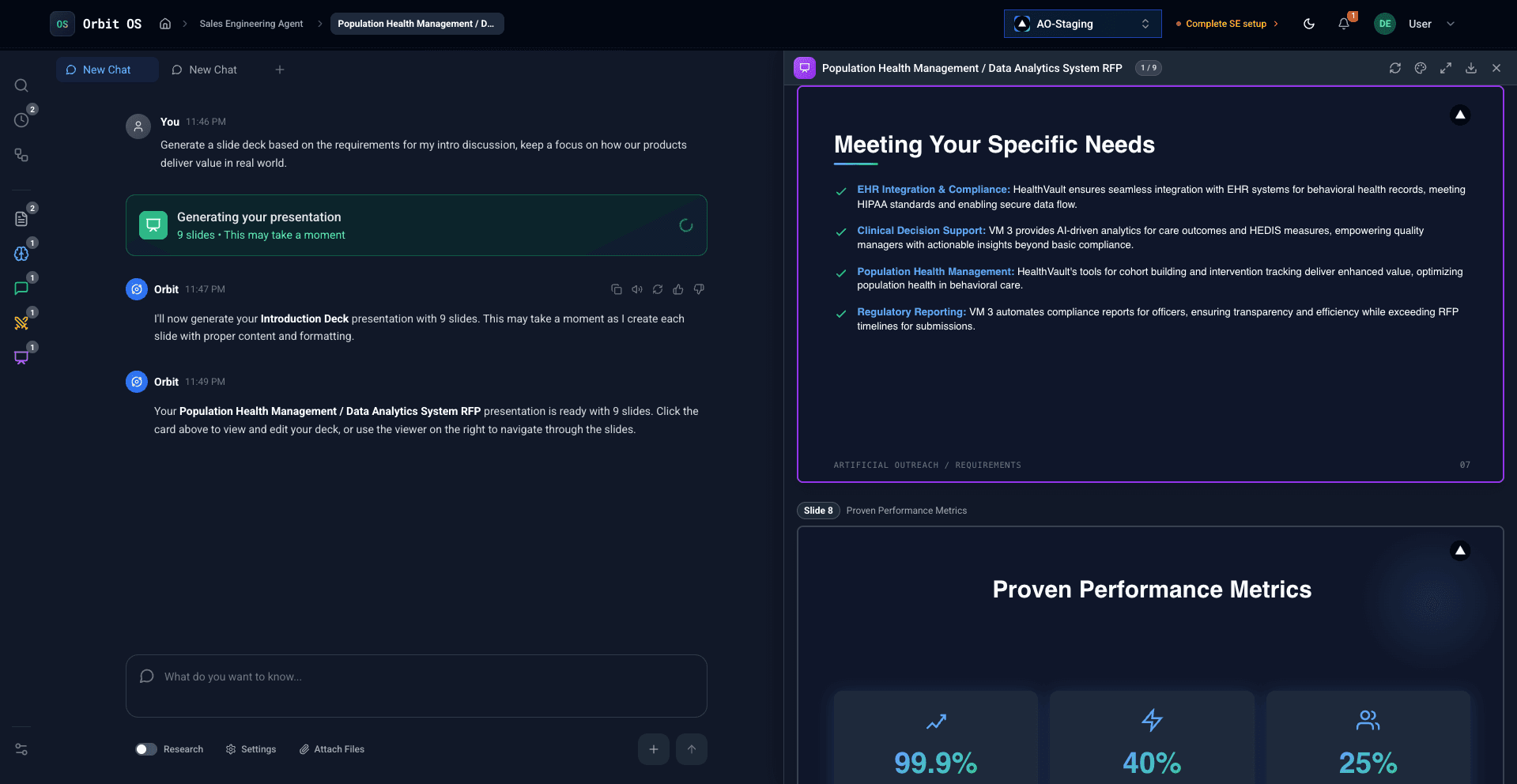
AI generates complete pitch decks with consistent branding and professional layouts
Craft Your Opening Slides
The first three slides determine whether your audience leans in or checks out. You have roughly 90 seconds to earn their attention. Here's how to use them.
Slide 1: Cover
Your company name, logo, and a one-line value proposition that makes the audience want to hear more. Skip the mission statement — lead with what you do for them. Example: "Helping sales teams close 40% more deals with AI-powered proposals" beats "We're on a mission to transform the future of sales enablement."
Slide 2: Problem
Lead with the audience's pain, not your perspective. Use a specific data point to anchor the problem: "Sales engineers spend 15+ hours per week on proposals that could be automated." If you can make the audience feel the cost of inaction — in time, money, or missed opportunity — they'll want to hear your solution.
Slide 3: Solution
State your approach in one sentence, then break it into three pillars or components. Don't try to explain everything — give them the mental model. Example: "OrbitOS automates the three most time-consuming parts of sales engineering: proposal drafting, pitch deck creation, and RFP responses." Three pillars are memorable. Seven are not.
A common mistake in opening slides is spending too long on the cover or company background. Your audience doesn't care about your founding story yet — they care about their problem. Get to the problem within 60 seconds.
Build Solution & Proof Slides
The middle of your deck is where you earn credibility. This is where you move from "interesting idea" to "I believe this works." The principle here is simple: show, don't tell.
How It Works
Break your solution into a 3-step process. People process sequential information faster than feature lists. "Upload your content. AI generates the deck. You customize and present." Three steps. Clear. Memorable. Even complex products can be reduced to three steps if you focus on the user's journey rather than the technical architecture.
Key Features
Pick 3-4 features maximum. These should be the capabilities that directly address the problem you identified in your opening slides. For each feature, lead with the benefit, then briefly explain the mechanism. "Generate branded decks in minutes (AI handles layout, design, and content assembly)" — benefit first, mechanism second.
Social Proof
This is your most powerful slide. Options, in order of impact: a detailed case study with before/after metrics, a grid of recognizable client logos, a direct customer quote with attribution, or industry awards and certifications. If you have a case study from a company similar to the audience's, lead with that. Relevance beats prestige.
Results
Use specific metrics, not vague claims. "34% increase in close rates" beats "significantly improved performance." "From 2 weeks to 2 hours" beats "much faster turnaround." If possible, tie your results to the financial impact: "The average customer saves $15,000 per month in sales engineering time." Numbers with context are persuasion.
Close with a Strong CTA
The final 2-3 slides of your pitch deck carry more weight than most people realize. This is where deals get made or lost. A strong presentation followed by a weak close is a wasted opportunity.
Pricing / Packages
If appropriate for your deck type, include a pricing slide. For sales decks, showing 2-3 tiers works well — it frames the decision as "which package" rather than "yes or no." Keep it clean: tier name, price, what's included (5 items max per tier), and a visual highlight on the recommended option. If pricing is custom, show the starting point or typical range.
Clear Next Step
Make the ask specific and low-friction. "Let's schedule a 30-minute technical demo this Thursday" is better than "Let me know if you're interested." Give them a concrete action, a timeline, and make it easy to say yes. Offer to send follow-up materials — a summary email, a one-pager, or a custom proposal — so the conversation continues even after the meeting ends.
Contact Information
Your final slide should include your name, email, phone number, and LinkedIn profile. Add your company's website URL. If you have a booking link for scheduling follow-ups (Calendly, HubSpot meetings, etc.), include it prominently. Reduce every possible friction point between "I'm interested" and "I've scheduled the next call."
Closing tip: Include a timeline. Show what the next 30 days look like if they say yes today — onboarding steps, key milestones, first results. It makes the decision feel tangible and reduces the perceived risk of moving forward.
Review, Practice & Export
Your deck is built. Now comes the step that separates good presentations from great ones: refinement.
Get a fresh pair of eyes. Send your deck to someone who hasn't seen it — ideally someone similar to your target audience. Ask them two questions: "What's the main thing this deck is asking you to do?" and "What's unclear?" If they can't answer the first question in one sentence, your narrative needs work.
Practice the talk track. Present the deck out loud at least three times. The first run reveals where your transitions are awkward. The second reveals where you're spending too long on one slide. By the third, you should feel natural. Never read from your slides — they're visual support, not a script.
Time yourself. Budget 1-2 minutes per slide. A 12-slide deck should take 15-20 minutes including a brief Q&A. If you're running over, you either have too many slides or too much detail on each one. Cut ruthlessly.
Check the details. Spell-check every slide. Verify all numbers and data points. Test every link. Make sure fonts render correctly on the presentation device. These details don't win deals, but mistakes in them can lose them.
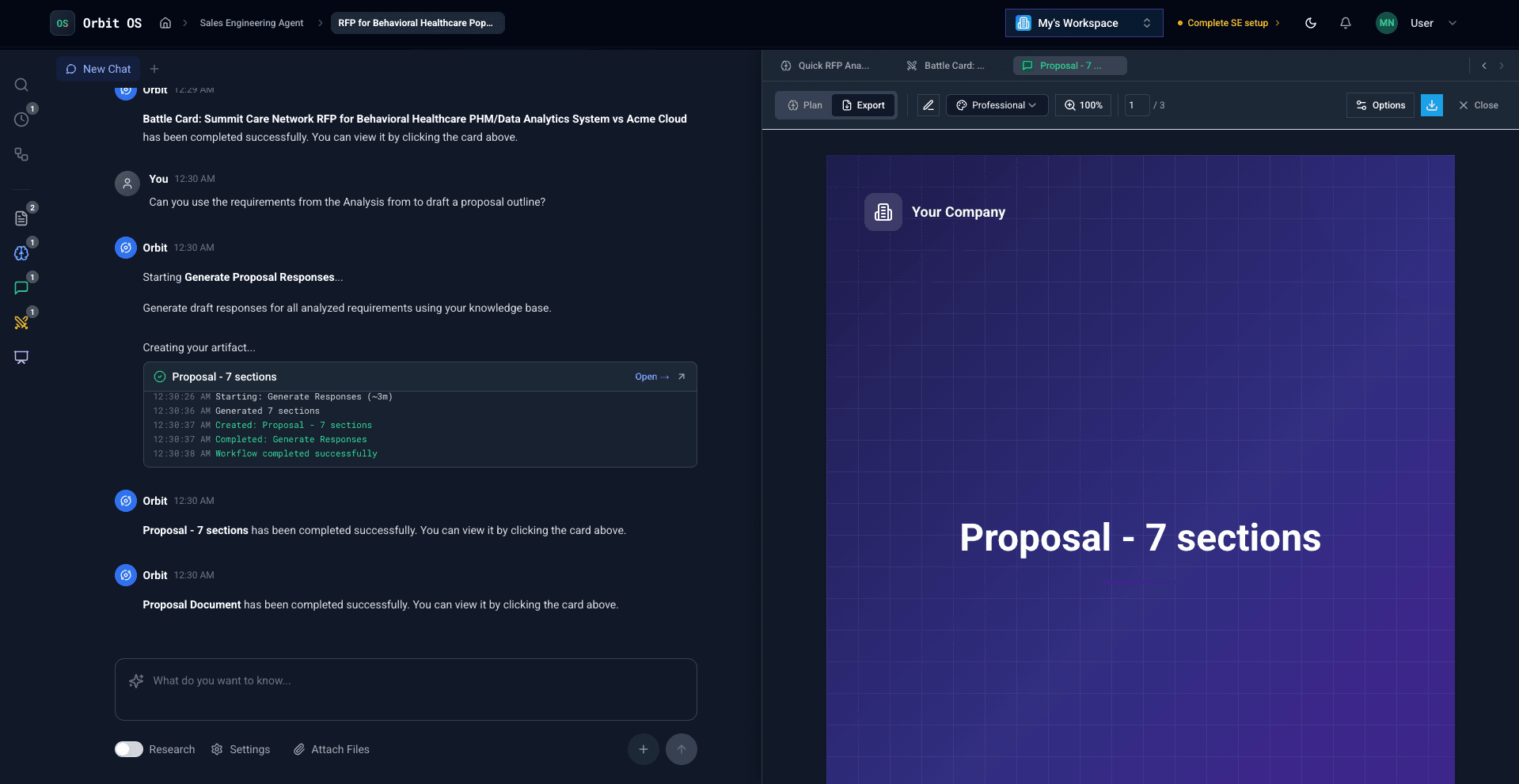
One-click export with preserved branding across PowerPoint, PDF, and Google Slides
Generate Pitch Decks in Minutes
Stop spending days on slide design. Upload your content and AI creates a branded, presentation-ready pitch deck you'll actually want to present.
Try the Sales Engineering AgentThe 10-Slide Pitch Deck Template
If you're starting from scratch, this structure works for most sales and investor decks. Adapt it to your audience, but the flow is battle-tested.
Pitch Deck FAQ
Answers to common questions about creating and delivering pitch decks
10-15 slides is the sweet spot. Investors and buyers lose focus after 15 slides, and anything under 8 usually means you're skipping something important. Every slide should earn its place — if it doesn't advance your narrative or answer a key question, cut it.
PowerPoint (.pptx) is best for editability and offline presentations. PDF is ideal for sharing via email since it preserves formatting across devices. Google Slides works well for collaborative editing and remote presentations. Design in whichever tool you're fastest with, then export to the format your audience prefers.
For sales decks, yes — including pricing signals transparency and saves everyone time. Buyers appreciate knowing ballpark costs upfront. For investor decks, focus on the business model and revenue mechanics instead of specific pricing. For partnership decks, pricing is usually discussed separately.
15-20 minutes including Q&A. Budget 1-2 minutes per slide, and always leave at least 5 minutes for discussion. The best presenters finish slightly early — it shows confidence and respect for the audience's time. If you're going over 20 minutes, you have too many slides or too much detail.
AI handles the heavy lifting — structure, content assembly, and design — giving you a polished starting point to customize with your expertise. The best results come from combining AI-generated drafts with your domain knowledge, personal anecdotes, and specific client context. Think of AI as your first-draft specialist, not your final editor.
Too much text. Slides should support your narrative, not replace it. If someone can read your deck and skip the meeting, you have a document, not a deck. Other common mistakes: burying the ask, leading with features instead of problems, and using generic stock photos instead of real product screenshots or data.
Anticipate the top 5 questions your audience will ask, and prepare data-backed answers for each. During Q&A, repeat the question before answering so everyone hears it. Don't be afraid to say "I'll follow up on that with specific numbers" for unexpected questions — it's better than guessing. Always end Q&A by restating your ask.
Build Pitch Decks That Close Deals
Join teams using AI to create branded, compelling pitch decks in minutes — so they can spend their time practicing the delivery, not fighting with slides.